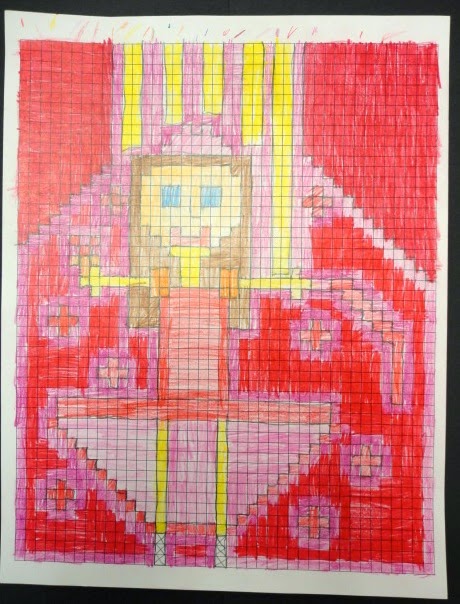
If you don't like this project, there may be something wrong with you. (Go get it checked out!) This is just pure fun for me. I originally designed the project to be a throw-back to the 8-bit video games I played while I was growing up. I've noticed quite a bit of 8-bit retro style popping up all over the place lately. Many game apps are created to have an older look to hook all of the nostalgic 30 and 40 somethings out there.
Of course half of my students are completely obsessed with Minecraft lately. The cubic style of that game plays right into the style of this lesson as well. A lot of my younger students even think that this is a Minecraft project.
I love the results of this lesson, but it does get a little tedious for some my students. There is a lot of very precise coloring. Ideally, I would love to do this project on the computer. Does anyone know of a program that would work for this type of a project?
Download my lesson plan here!
I grew up in the 80's. Everything was neon, there was a lot of hairspray, and it was the golden age of video games. I could usually be found playing outside, but I also enjoyed sitting down with the NES playing video games on cold or rainy days. Since the 80's are apparently cool again (why???), I've noticed quite of design that is inspired by 80's 8-bit video game design. That was the basis for this project.
I was totally psyched to start this project. I put together a Keynote that not only contained sweet 8-bit game characters, but the theme music from the games as well. Teaching art with the Zelda theme in the background simply makes everything a little more epic. My students discussed the qualities and restrictions of 8-bit style and then used some simple grid paper to create a couple of practice versions of themselves as an 8-bit character. Students could do a more realistic version or they had the option of putting themselves in a video game of their own creation.
The final version was done on a grid that I photocopied onto card stock. The work was drawn out with pencil, then colored with colored pencils. I just wrote this lesson this year, and I think it turned out really cool. I may think about using a slightly larger grid next year, but I was very happy with the results overall.
Click here to download my lesson plan!